FightFlow 1.2.5: Build My Session and Watch Drills From Above
Pick a combo, a skill or a goal, and FightFlow 1.2.5 plans the session and adapts the next one to how it went. Plus drills you can watch before you train.
FightFlow Team
•
October 20, 2026
•
6 min read
Structured solo training
Keep skill work sharp between gym sessions.
FightFlow turns solo boxing, kickboxing, and Muay Thai into reactive rounds with offense, defense, footwork, targets, constraints, and saved routines.
FightFlow 1.2.5 is out on iPhone and Android. Here's what's new:
- Build my session: tell FightFlow what you want to get better at, and it plans the session around it.
- Watch a drill before you train it: every drill plays out from above first.
- Four goals to train toward when you don't have one combo in mind.
- The oblique kick for Muay Thai.
- Kickboxing that only shows what kickboxing allows.
- Conditioning on your watch.
- Moves Trained for every round of a routine.
Build My Session
Most of us know what we want to fix. The combo that falls apart when we're tired. The jab that's slow coming back. What's harder is turning that into a session, and then into the next one.
That's what Build my session is for. On the Training tab, tap Sharpen a combo or skill. Pick a combo, a skill or a goal, say how long you have (5 to 30 minutes) and how well you know it. FightFlow plans the rounds for you.
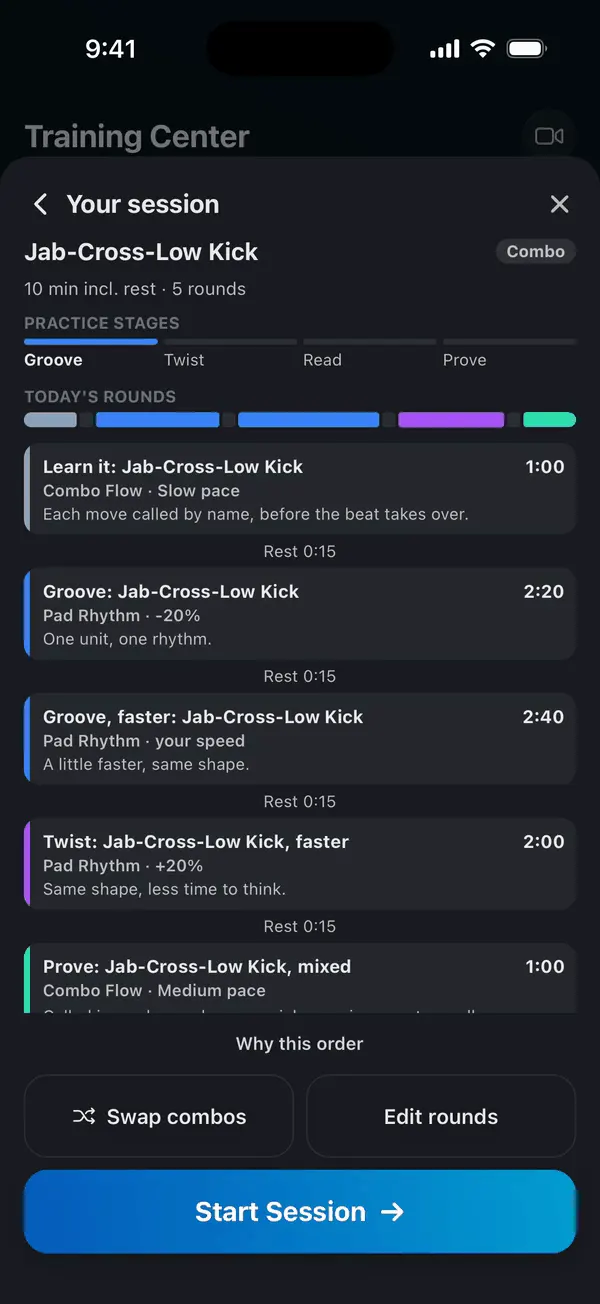
A session builds on itself. If the combo is new to you, it's called move by move first, then you drill it to a rhythm, then a little faster, and at the end you test it mixed in with other combos. Once you know it, the rounds start changing one thing at a time: a step in first, a new target, an extra shot at the end. Later on, the call sets up a moment and you answer it.
It plans the next one too
When you finish, FightFlow asks how the session felt, and one question that matters most: did it come out? Yes, Mostly or Not yet.
That answer shapes your next session. Say Yes and it picks up the pace. Say Yes twice in a row and you move on to the next stage. Say Not yet and it eases off. Rate it Hard and you get more rest between rounds.
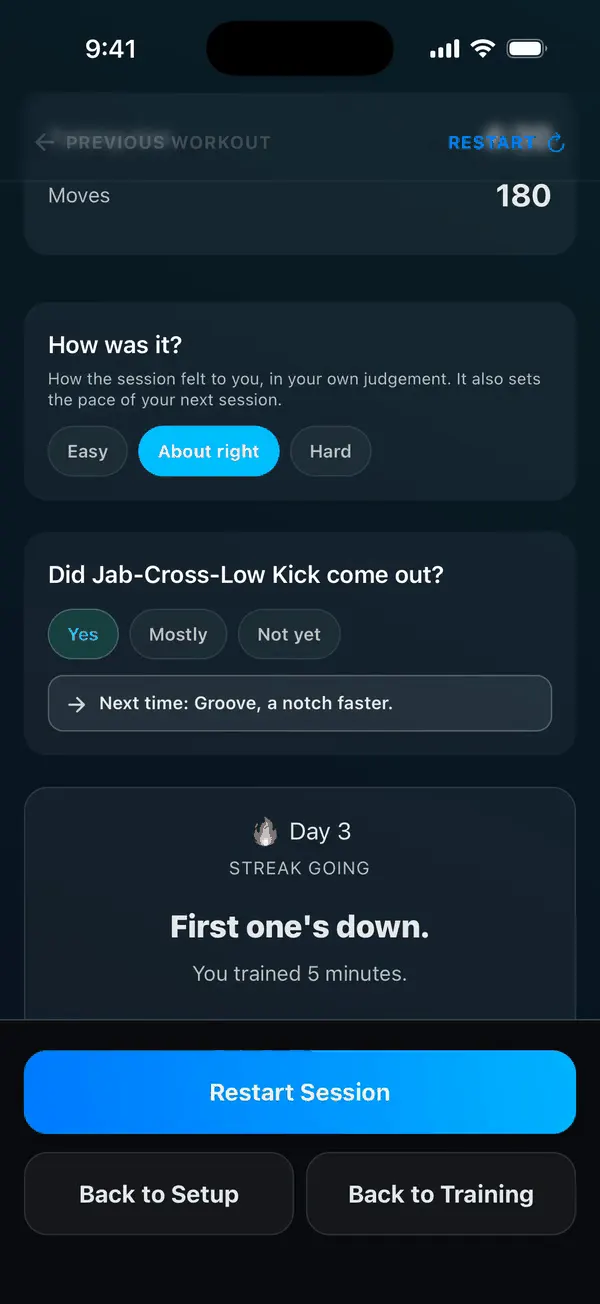
Here's how that plays out with Jab-Cross-Low Kick, 10 minutes, new to it:
- Day 1: learn it move by move, drill it to a beat, speed it up, then test it mixed in with another combo. It came out: Yes.
- Day 2: the same session, faster all the way through, and the final test mixes in more combos. Yes again.
- Day 3: now it changes. The same combo with an extra jab at the end, then with the jab going to the body. A rough day: Not yet, and it felt hard.
- Day 4: it slows down and gives you longer rests between rounds.
One thing to know: FightFlow doesn't watch you train. It goes by your answer, so the more honest the answer, the better the next session. That's what Mostly is for.
Free accounts can build sessions up to 10 minutes. With Unlimited you can go up to 30.
Four Goals for When You Don't Have a Combo in Mind
Sometimes you don't want to sharpen one thing. You want to fix a gap. The Goal tab has four:
- Balance my training looks at what you've trained this month and starts on what you've done least.
- Defense under pressure: slip, cover and return as the attacks are called.
- Faster hands: quicker reloads and cleaner rhythm.
- Engine: conditioning first, with your hands working.
They work in boxing, kickboxing and Muay Thai, and they adapt to your answers the same way.
Watch a Drill Before You Train It
Reading a drill and doing it are two different things. Which foot moves first? Which hand answers the hook?
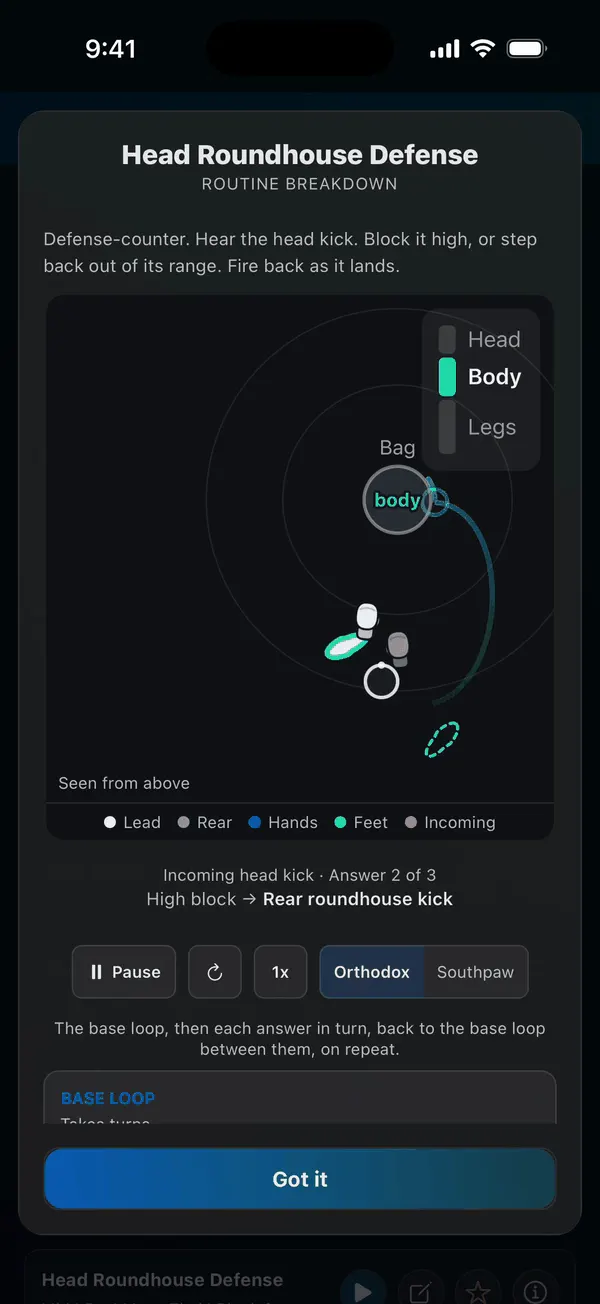
Now every hand, footwork, defense, kick and elbow drill, 64 of them, plays out from above before you start. Open a drill's Info and watch it: where your feet go, which hand or leg throws, where each strike lands and what's coming at you. Flip it to southpaw, slow it down, or play one part of the drill on repeat until it clicks. On the drill's setup screen it plays at the pace you've set, so you see exactly what you're about to train.
The Oblique Kick, for Muay Thai
The stamp to the front of the opponent's lead leg is now in FightFlow for Muay Thai: the move itself, a kick drill to throw it, a defense drill to stop it, five Pad Rhythm combos and a new Skill Academy level. It's Muay Thai only because kickboxing rules like GLORY's and WAKO's ban it. If you want the technique first, read How to Throw the Oblique Kick.
Kickboxing, Without the Muay Thai Extras
If kickboxing is your discipline, FightFlow now only shows what kickboxing rules allow. No elbows, no clinch work, no sweeps, no kick catches and no oblique kicks in your drills, combos, Pad Rhythm or Rounds Mode. Less scrolling past things you can't use. Your own combos are always there.
Conditioning on Your Watch
Intervals are easier when you're not looking at your phone. During Conditioning, your Apple Watch or Wear OS watch now shows whether you're working or resting, the countdown for the interval, and during rest, what's next. It taps your wrist when work starts and when rest starts, and your heart rate stays on screen. New to FightFlow on the watch? Here's the setup for Apple Watch and Wear OS.
Moves Trained for the Whole Routine
After a Rounds Mode routine, Session End now shows what you trained in every round, drills and Pad Rhythm included, not just the last round. That includes the sessions Build my session plans for you.
Fixes
- Saving and exporting clips works properly on Android.
- Headings on Android 15 show in full.
- Pad Rhythm opens faster on Android.
- Clearer pronunciation on nine voice calls.
- Defense drills answer the attack they're built for.
- The random Quick Train mode is now called Move Flow.
Keep reading
FightFlow 1.2.6: Screen Off on Android and Pendulum Footwork
•
8 min read
FightFlow 1.2.6 lets you train with the screen off on Android in every mode, adds pendulum footwork drills, and leaves more time after kicks and knees.
Apple Watch Boxing Training: How FightFlow Measures Effort
•
5 min read
Connect your watch and FightFlow shows heart rate, calories, and zones from what your watch recorded. No weight or age formulas. Free for everyone.
Wear OS Boxing Training: How FightFlow Measures Effort
•
5 min read
Heart rate, calories and zones for your sessions, from what your Galaxy Watch, Pixel Watch, Garmin or chest strap recorded. No weight or age formulas.
Train it with FightFlow
Voice-led rounds for boxing, kickboxing, and Muay Thai. Free for 10 active minutes a day.